Table of Contents
| Section | Page |
|---|---|
| Introduction | 4 |
| Instrument Cluster | 10 |
| Warning and control lights | 10 |
| Gauges | 15 |
| Entertainment Systems | 18 |
| AM/FM stereo | 18 |
| AM/FM stereo with CD | 20 |
| AM/FM stereo cassette with CD | 23 |
| AM/FM stereo with in-dash six CD | 26 |
| Climate Controls | 32 |
| Heater only | 32 |
| Manual heating and air conditioning | 33 |
| Electronic automatic temperature control | 35 |
| Rear window defroster | 41 |
| Lights | 42 |
| Headlamps | 42 |
| Turn signal control | 46 |
| Bulb replacement | 48 |
| Driver Controls | 53 |
| Windshield wiper/washer control | 53 |
| Steering wheel adjustment | 54 |
| Power windows | 59 |
| Mirrors | 60 |
| Speed control | 63 |
| Message center | 71 |
| Tailgate | 81 |
Table of Contents
Locks and Security
84
- Keys 84
- Locks 84
- Anti-theft system 95
Seating and Safety Restraints
99
- Seating 99
- Safety restraints 104
- Air bags 121
- Child restraints 134
Driving
149
- Starting 149
- Brakes 154
- Transmission operation 156
- Vehicle loading 176
- Trailer towing 179
- Recreational towing 189
Roadside Emergencies
193
- Getting roadside assistance 193
- Hazard flasher switch 194
- Fuel pump shut-off switch 194
- Fuses and relays 195
- Changing tires 203
- Jump starting 209
- Wrecker towing 214
Customer Assistance
215
- Reporting safety defects (U.S. only) 223
Cleaning
224
2
Table of Contents
Maintenance and Specifications 230
- Engine compartment 232
- Engine oil 234
- Battery 237
- Fuel information 245
- Air filter(s) 260
- Tire Information 263
- Part numbers 275
- Refill capacities 276
- Lubricant specifications 280
Accessories 291
Index 294
All rights reserved. Reproduction by any means, electronic or mechanical including photocopying, recording or by any information storage and retrieval system or translation in whole or part is not permitted without written authorization from Ford Motor Company. Ford may change the contents without notice and without incurring obligation.
Copyright © 2004 Ford Motor Company
3
Introduction
CALIFORNIA Proposition 65 Warning
WARNING: Engine exhaust, some of its constituents, and certain vehicle components contain or emit chemicals known to the State of California to cause cancer and birth defects or other reproductive harm. In addition, certain fluids contained in vehicles and certain products of component wear contain or emit chemicals known to the State of California to cause cancer and birth defects or other reproductive harm.
CONGRATULATIONS
Congratulations on acquiring your new Ford. Please take the time to get well acquainted with your vehicle by reading this handbook. The more you know and understand about your vehicle, the greater the safety and pleasure you will derive from driving it.
For more information on Ford Motor Company and its products visit the following website:
- In the United States: www.ford.com
- In Canada: www.ford.ca
- In Australia: www.ford.com.au
- In Mexico: www.ford.com.mx
Additional owner information is given in separate publications.
This Owner's Guide describes every option and model variant available and therefore some of the items covered may not apply to your particular vehicle. Furthermore, due to printing cycles it may describe options before they are generally available.
Remember to pass on this Owner's Guide when reselling the vehicle. It is an integral part of the vehicle.
Fuel pump shut-off switch: In the event of an accident the safety switch will automatically cut off the fuel supply to the engine. The switch can also be activated through sudden vibration (e.g. collision when parking). To reset the switch, refer to the Fuel pump shut-off switch in the Roadside Emergencies chapter.
SAFETY AND ENVIRONMENT PROTECTION
Warning symbols in this guide
How can you reduce the risk of personal injury to yourself or others? In this guide, answers to such questions are contained in comments highlighted by the warning triangle symbol. These comments should be read and observed.
4
Introduction
Warning symbols on your vehicle
When you see this symbol, it is imperative that you consult the relevant section of this guide before touching or attempting adjustment of any kind.

Protecting the environment
We must all play our part in protecting the environment. Correct vehicle usage and the authorized disposal of waste, cleaning and lubrication materials are significant steps towards this aim. Information in this respect is highlighted in this guide with the tree symbol.

BREAKING-IN YOUR VEHICLE
Your vehicle does not need an extensive break-in. Try not to drive continuously at the same speed for the first 1,000 miles (1,600 km) of new vehicle operation. Vary your speed frequently in order to give the moving parts a chance to break in.
Drive your new vehicle at least 500 miles (800 km) before towing a trailer. Additionally, during the first 500 miles (800 km) that you tow a trailer, do not drive over 50 mph (80 km/h) and do not make starts at full throttle. This style of driving will help the engine and other parts of your vehicle wear-in at the heavier loads.
Do not add friction modifier compounds or special break-in oils during the first few thousand miles (kilometers) of operation, since these additives may prevent piston ring seating. See Engine oil in the Maintenance and Specifications chapter for more information on oil usage.
SPECIAL NOTICES
Emission warranty
The New Vehicle Limited Warranty includes Bumper-to-Bumper Coverage, Safety Restraint Coverage, Corrosion Coverage, and 6.0L Power Stroke Diesel Engine Coverage. In addition, your vehicle is eligible for Emissions Defect and Emissions Performance Warranties. For a detailed description of what is covered and what is not covered, refer to the Warranty Guide that is provided to you along with your Owner's Guide.
5
Introduction
Service Data Recording
Service data recorders in your vehicle are capable of collecting and storing diagnostic information about your vehicle. This potentially includes information about the performance or status of various systems and modules in the vehicle, such as engine, throttle, steering or brake systems. In order to properly diagnose and service your vehicle, Ford Motor Company, Ford of Canada, and service and repair facilities may access vehicle diagnostic information through a direct connection to your vehicle when diagnosing or servicing your vehicle.
Event Data Recording
Other modules in your vehicle — event data recorders — are capable of collecting and storing data during a crash or near crash event. The recorded information may assist in the investigation of such an event. The modules may record information about both the vehicle and the occupants, potentially including information such as:
• how various systems in your vehicle were operating;
• whether or not the driver and passenger seatbelts were buckled;
• how far (if at all) the driver was depressing the accelerator and/or the brake pedal;
• how fast the vehicle was traveling; and
• where the driver was positioning the steering wheel.
To access this information, special equipment must be directly connected to the recording modules. Ford Motor Company and Ford of Canada do not access event data recorder information without obtaining consent, unless pursuant to court order or where required by law enforcement, other government authorities or other third parties acting with lawful authority. Other parties may seek to access the information independently of Ford Motor Company and Ford of Canada.
Special instructions
For your added safety, your vehicle is fitted with sophisticated electronic controls.
Please read the section Supplemental restraint system (SRS) in the Seating and Safety Restraints chapter. Failure to follow the specific warnings and instructions could result in personal injury.
6
Introduction
!
Front seat mounted rear-facing child or infant seats should NEVER be placed in front of an active passenger air bag.
Using your vehicle with a snowplow
For more information and guidelines for using your vehicle with a snowplow, refer to the Driving chapter.
F150 SuperCrew Owners: Snowplowing
Your vehicle is not recommended for snowplowing. Ford makes no representation as to the suitability of your vehicle for snowplowing, in particular regarding the potential for exceeding vehicle weight limits, airbag (SRS) deployment sensitivity, vehicle crash integrity, or powertrain durability. The Snowplow Package Option is not available.
Using your vehicle as an ambulance
Do not use this vehicle as an ambulance.
Your vehicle is not equipped with the Ford Ambulance Preparation Package.
Notice to owners of pickup trucks and utility type vehicles
!
Utility vehicles have a significantly higher rollover rate than other types of vehicles.
Before you drive your vehicle, please read this Owner’s Guide carefully. Your vehicle is not a passenger car. As with other vehicles of this type, failure to operate this vehicle correctly may result in loss of vehicle control, vehicle rollover, personal injury or death.
Be sure to read Driving off road in the Driving chapter.
MIDDLE EAST/NORTH AFRICA VEHICLE SPECIFIC INFORMATION
For your particular global region, your vehicle may be equipped with features and options that are different from the ones that are described in this Owner’s Guide; therefore, a supplement has been supplied that complements this book. By referring to the pages in the provided supplement, you can properly identify those features, recommendations and specifications that are unique to your vehicle. Refer to this Owner’s Guide for all other required information and warnings.
7
Introduction
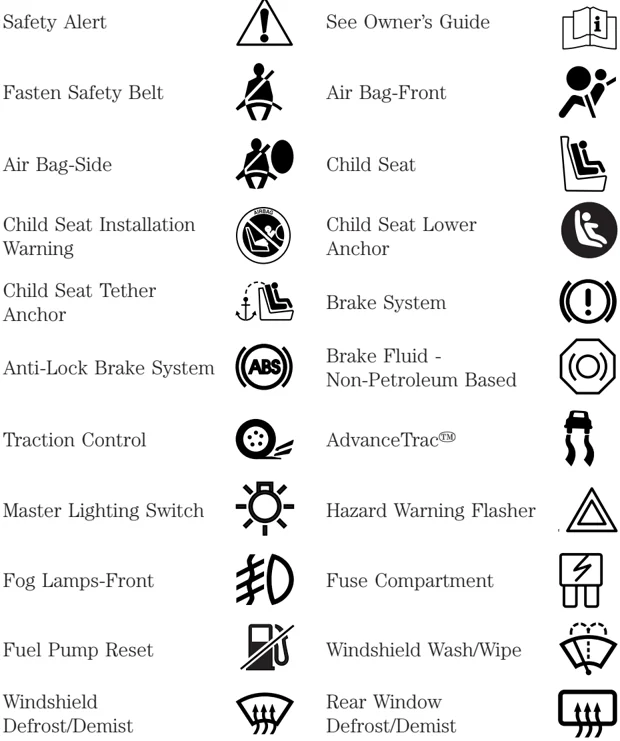
These are some of the symbols you may see on your vehicle.
V ehicle Symbol Glossary
Safety Alert See Owner’s Guide
Fasten Safety Belt Air Bag-Front
Air Bag-Side Child Seat
Child Seat Installation Warning Child Seat Lower Anchor
Child Seat Tether Anchor Brake System
Anti-Lock Brake System Brake Fluid - Non-Petroleum Based
Traction Control AdvanceTrac™
Master Lighting Switch Hazard Warning Flasher
Fog Lamps-Front Fuse Compartment
Fuel Pump Reset Windshield Wash/Wipe
Windshield Defrost/Demist Rear Window Defrost/Demist
8
Introduction
Vehicle Symbol Glossary
Power Windows Front/Rear Power Window Lockout
Child Safety Door Lock/Unlock Interior Luggage Compartment Release Symbol
Panic Alarm Engine Oil
Engine Coolant Engine Coolant Temperature
Do Not Open When Hot Battery
Avoid Smoking, Flames, or Sparks Battery Acid
Explosive Gas Fan Warning
Power Steering Fluid Maintain Correct Fluid Level
Emission System Engine Air Filter
Passenger Compartment Air Filter Jack
Check fuel cap Low tire warning
9
Instrument Cluster
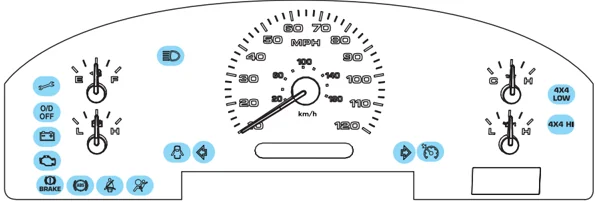
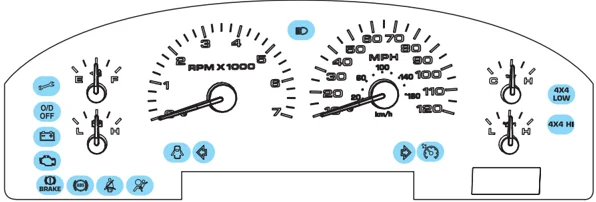
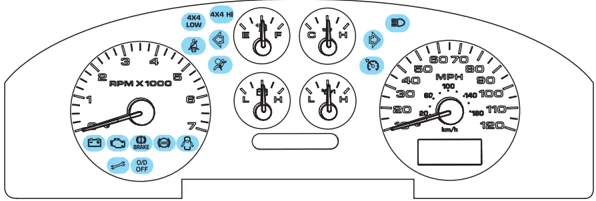
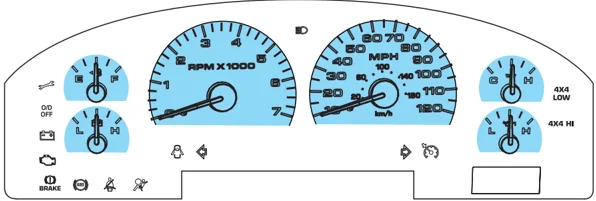
WARNING LIGHTS AND CHIMES
Base instrument cluster
Base with Tachometer instrument cluster
Mid instrument cluster
10
Instrument Cluster
Luxury instrument cluster
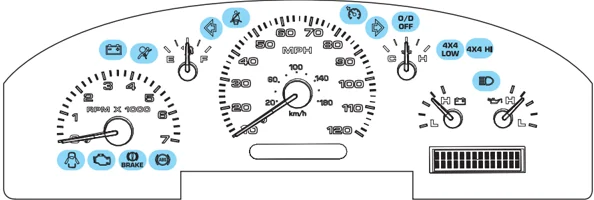
Warning lights and gauges can alert you to a vehicle condition that may become serious enough to cause expensive repairs. A warning light may illuminate when a problem exists with one of your vehicle’s functions. Many lights will illuminate when you start your vehicle to make sure the bulb works. If any light remains on after starting the vehicle, have the respective system inspected immediately.
Service engine soon: The Service engine soon indicator light illuminates when the ignition is first turned to the ON position to check the bulb. Solid illumination after the engine is started indicates the On Board Diagnostics System (OBD-II) has detected a malfunction. Refer to On board diagnostics (OBD-II) in the Maintenance and Specifications chapter. If the light is blinking, engine misfire is occurring which could damage your catalytic converter. Drive in a moderate fashion (avoid heavy acceleration and deceleration) and have your vehicle serviced immediately.
Under engine misfire conditions, excessive exhaust temperatures could damage the catalytic converter, the fuel system, interior floor coverings or other vehicle components, possibly causing a fire.
Electronic throttle control (if equipped): Illuminates when the engine has defaulted to a 'limp-home' operation. Report the fault to a dealer at the earliest opportunity.
11
Instrument Cluster
On vehicles equipped with a message center, “ENGINE FAILSAFE MODE” will be displayed, refer to Message Center in the Driver Controls chapter.
Brake system warning light: To confirm the brake system warning light is functional, it will momentarily illuminate when the ignition is turned to the ON position when the engine is not running, or in a position between ON and START, or by applying the parking brake when the ignition is turned to the ON position. If the brake system warning light does not illuminate at this time, seek service immediately from your dealership. Illumination after releasing the parking brake indicates low brake fluid level and the brake system should be inspected immediately by your servicing dealership.

Driving a vehicle with the brake system warning light on is dangerous. A significant decrease in braking performance may occur. It will take you longer to stop the vehicle. Have the vehicle checked by your dealer immediately.
Anti-lock brake system: If the ABS light stays illuminated or continues to flash, a malfunction has been detected, have the system serviced immediately. Normal braking is still functional unless the brake warning light also is illuminated.

Air bag readiness: If this light fails to illuminate when ignition is turned to ON, continues to flash or remains on, have the system serviced immediately. A chime will also sound when a malfunction in the supplemental restraint system has been detected.
Safety belt: Reminds you to fasten your safety belt. A chime will also sound to remind you to fasten your safety belt.
12
Instrument Cluster
Charging system: Illuminates when the battery is not charging properly.

Door ajar: Illuminates when the ignition is in the ON position and any door is open.

Overdrive off (if equipped): Illuminates when the overdrive function of the transmission has been turned off, refer to the Driving chapter. If the light flashes steadily or does not illuminate, have the transmission serviced soon, or damage may occur. O/D OFF
Four wheel drive low: Illuminates when four-wheel drive low is engaged. 4x4 LOW
Four wheel drive high: Illuminates when four-wheel drive high is engaged. 4x4 HI
Speed control: Illuminates when the speed control is activated. Turns off when the speed control system is deactivated.

Turn signal: Illuminates when the left or right turn signal or the hazard lights are turned on. If the indicators stay on or flash faster, check for a burned out bulb.

High beams: Illuminates when the high beam headlamps are turned on.

13
Instrument Cluster
MINI MESSAGE CENTER WARNING DISPLAYS (IF EQUIPPED)
Door ajar: Displays when the ignition is in the ON position and any door is open.
Low fuel: Displays when the fuel level in the fuel tank is at or near empty (refer to Fuel gauge in this chapter).
Check fuel cap: Displays when the fuel cap may not be properly installed. Continued driving with this display on may cause the Service engine soon warning light to come on. Refer to Fuel filler cap under the Fuel Information section in the Maintenance and Specifications chapter.
Check gauge: Displays when any of the following conditions has occurred:
- The engine coolant temperature is high.
- The engine oil pressure is low.
- The fuel gauge is at or near empty.
Trans Fault: Displays when a transmission problem has been detected and shifting may be restricted. If the light remains on, have the system serviced immediately.
Key-in-ignition warning chime: Sounds when the key is left in the ignition in the OFF/LOCK or ACCESSORY position and the driver's door is opened.
Headlamps on warning chime: Sounds when the headlamps or parking lamps are on, the ignition is off (the key is not in the ignition) and the driver's door is opened.
14
Instrument Cluster
GAUGES
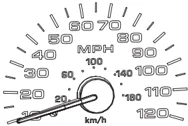
Speedometer: Indicates the current vehicle speed.
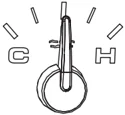
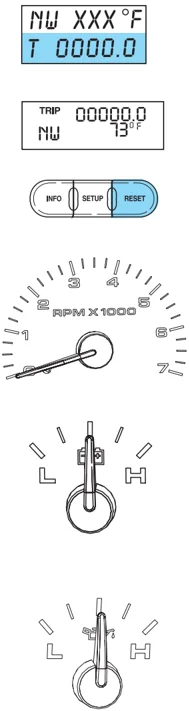
Engine coolant temperature gauge: Indicates engine coolant temperature. At normal operating temperature, the needle will be in the normal range (between “H” and “C”). If it enters the red section, the engine is overheating. Stop the vehicle as soon as safely possible, switch off the engine and let the engine cool.
Never remove the coolant reservoir cap while the engine is running or hot.
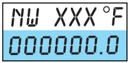
Odometer: Registers the total miles (kilometers) of the vehicle. • With Mini Message Center
15
Instrument Cluster
• With Full Message Center Refer to Message Center in the Drivers Controls chapter on how to switch the display from Metric to English.

Trip odometer: Registers the miles (kilometers) of individual journeys.
• With Mini Message Center Press and release the button on top of the cluster to toggle between odometer and trip odometer display.
• With Full Message Center Press and release the message center INFO button until TRIP mode appears in the display. Press the RESET button to reset.
Tachometer (if equipped): Indicates the engine speed in revolutions per minute. Driving with your tachometer pointer continuously at the top of the scale may damage the engine.
Battery voltage gauge: Indicates the battery voltage when the ignition is in the ON position. If the pointer moves and stays outside the normal operating range (as indicated by arrows), have the vehicle’s electrical system checked as soon as possible.
Engine oil pressure gauge: Indicates engine oil pressure. The needle should stay in the normal operating range (between “L” and “H”). If the needle falls below the normal range, stop the vehicle, turn
16
Instrument Cluster
off the engine and check the engine oil level. Add oil if needed. If the oil level is correct, have your vehicle checked at your dealership or by a qualified technician.
Fuel gauge: Indicates approximately how much fuel is left in the fuel tank (when the ignition is in the ON position). The fuel gauge may vary slightly when the vehicle is in motion or on a grade.
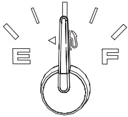
The arrow next to the fuel pump icon indicates which side of the vehicle the fuel filler door is located.
For more information, refer to Filling the tank under the Fuel Information section in the Maintenance and Specifications chapter.
17